The essentials
- LinkedIn’s raw "Save to PDF" inflates length to 3–5 pages and causes text scrambling in enterprise ATS parsers.
- Import your LinkedIn PDF into Ralue’s Master Profile to extract structured data in seconds without manual retyping.
- Curate outdated entries, apply an ATS single-column layout, and export to clean PDF or native Word (.docx).
Your LinkedIn profile is likely the most up-to-date record of your professional career. It lists your current job title, past employers, degrees, skills, and certifications.
When an attractive job opening appears, many job seekers use LinkedIn’s built-in feature: clicking More → Save to PDF and attaching the resulting file directly to an application portal.
Unfortunately, submitting a raw LinkedIn PDF is one of the fastest ways to get rejected by an Applicant Tracking System (ATS).
In this step-by-step guide, we explain why raw LinkedIn PDF downloads fail corporate ATS parsers and how you can convert your LinkedIn profile data into a clean, targeted, ATS-compliant resume using Ralue's free import tools.
Quick Summary: Why You Shouldn't Submit a Raw LinkedIn PDF
Aspect | LinkedIn "Save to PDF" Output | Converted ATS Resume (Ralue) |
|---|---|---|
Document Length | Artificially inflated to 3–5 pages due to poor layout | Compact, recruiter-friendly 1–2 pages |
ATS Parseability | Poor; multi-column blocks and graphic icons scramble text | 100% single-column vertical flow with clean text extraction |
Customization | Zero; exports your entire public profile indiscriminately | Tailored to the specific job using the Master Profile & Job Match |
Visual Hierarchy | Cluttered with LinkedIn branding, logos, and raw URLs | Clean corporate typography with standardized section headers |
File Formats | Static PDF only | ATS-optimized PDF & native Microsoft Word (.docx) |
1. Why LinkedIn's "Save to PDF" Fails in Applicant Tracking Systems
LinkedIn’s "Save to PDF" tool was designed as a quick personal archive, not as a resume engine for corporate recruiting systems.
When you download a LinkedIn profile directly, the resulting document suffers from critical structural flaws:
- Bloated Page Count: LinkedIn places wide margins, large profile avatars, and extensive spacing between entries. A professional with just 3 to 4 years of experience frequently ends up with a 3-page or 4-page PDF. Recruiters reviewing hundreds of applications rarely read past page two.
- Parsing & Character Encoding Errors: The PDF generation engine used by LinkedIn uses non-standard font subsets. When parsed by older corporate ATS software (such as Taleo or iCIMS), characters often convert into gibberish or merge words together without spaces.
- Unfiltered Information: A strong resume should highlight only what is relevant to the target role. A raw LinkedIn PDF dumps every old college summer job, expired skill endorsement, and personal hobby onto the page, diluting your core qualifications.
- No Word (.docx) Option: Many recruitment agencies and enterprise portals specifically request resumes in Microsoft Word format. LinkedIn does not export to
.docx.
2. Step-by-Step: How to Convert Your LinkedIn Profile into a Professional Resume
Converting your LinkedIn data into an ATS-ready document in Ralue takes less than five minutes:
Step 1: Export your raw LinkedIn profile PDF
- Log in to your LinkedIn account on a desktop browser.
- Navigate to your profile page.
- Click the More button in your profile header (next to "Open to" and "Add profile section").
- Select Save to PDF and save the file to your computer.
Step 2: Import the file into Ralue's Master Profile
- Open Ralue and create a free account (no credit card required).
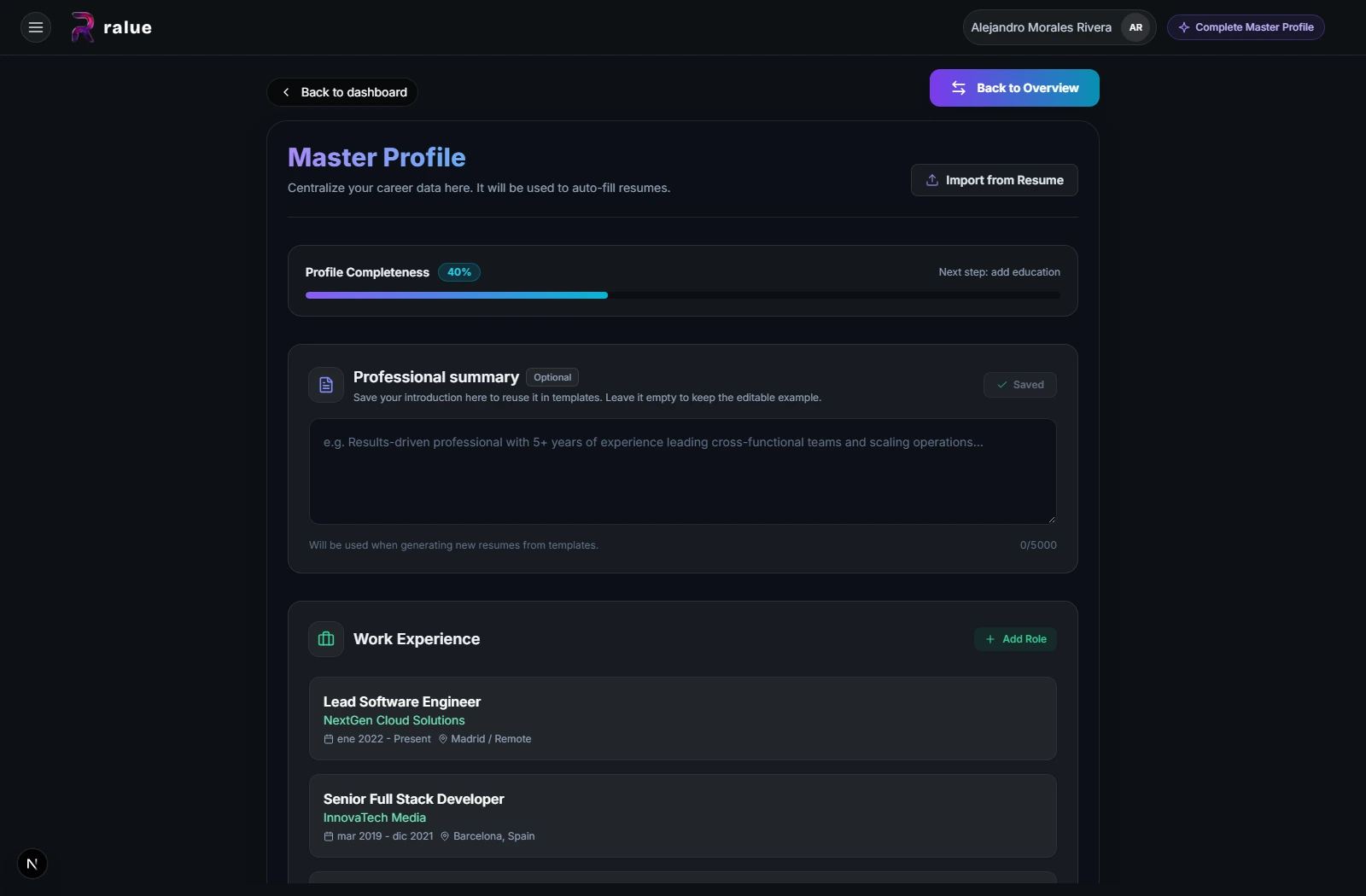
- In your dashboard, open the Master Profile (Perfil maestro).
- Select Import from LinkedIn PDF.
- Upload the PDF you just downloaded. Ralue’s parser will extract your job titles, company names, employment dates, education history, and skills list automatically into your centralized Master Profile.
Step 3: Curate and polish your career data
Once your data is in your Master Profile, you have full control over your career baseline:
- Remove irrelevant entries: Uncheck outdated summer jobs or obsolete software tools from your primary resume draft.
- Transform duties into achievements: Use the in-app editor to turn passive descriptions ("Responsible for marketing") into quantified bullet points ("Managed $15,000 monthly ad budget across Google and Meta, generating 450 qualified leads").
- Sync verified credentials: If you have technical certifications on Credly or projects on GitHub, link your accounts to import verified digital badges and repositories directly.
Step 4: Choose an ATS-compliant template
Select one of Ralue’s proven single-column layouts (such as Orion · ATS Precision or Apex · Liderazgo Ejecutivo). These templates ensure:
- Standardized headers (
Work Experience,Education,Skills). - Clean, extractable typography without hidden tables.
- Optimal page margins that fit your history onto 1 or 2 pages.
Step 5: Tailor with Job Match and export
Open the Job Match tool on the right-hand side of the editor. Paste the job description of the role you are targeting. Ralue compares your draft against the posting, flags missing technical keywords, and suggests contextual improvements with your explicit confirmation.
When finished, download your resume as an ATS-compliant PDF or a native Microsoft Word (.docx) file.
3. LinkedIn Profile vs Resume: Key Differences to Respect
Even after converting your data, remember that a LinkedIn profile and a resume serve different strategic purposes:
Element | LinkedIn Profile | Tailored Resume |
|---|---|---|
Tone | First-person ("I have led...", conversational) | Action-oriented third-person ("Led cross-functional team...") |
Scope | Comprehensive repository of all past work and connections | Highly curated document focused solely on the target opening |
Length | Unlimited scrolling | Strictly 1 or 2 pages |
Contact Info | Public web link, city, message button | Phone number, professional email, city/state, portfolio URL |
Audience | General public, recruiters browsing passively | Specific hiring team reviewing an active job application |
Verified Pros and Cons of Converting LinkedIn with Ralue
Pros:
- Saves hours of manual copy-pasting of employment dates, company names, and degrees.
- Transforms an unreadable 4-page LinkedIn PDF into a sleek 1–2 page ATS-compliant document.
- Stores your data in a centralized Master Profile for future resume variations.
- Generates native Microsoft Word (.docx) files as well as clean PDFs.
- Includes free Job Match analysis to align your resume with job postings.
Cons:
- LinkedIn's export does not include profile recommendations or media attachments; these must be added manually if desired.
- Bullet points drafted casually for social media will still require editorial refinement to showcase measurable business impact.
Frequently Asked Questions
Can I apply to jobs with LinkedIn's "Apply with LinkedIn" button instead?
Yes, many job boards feature an "Apply with LinkedIn" button. However, when you use that button, the employer's ATS receives your raw LinkedIn data profile. For competitive roles, submitting a customized ATS-tailored resume document almost always provides a stronger, more focused impression than an automated data dump.
Is the LinkedIn import feature free on Ralue?
Yes. Ralue includes LinkedIn PDF import in its permanent free tier, alongside GitHub, Credly, and Jira integrations.
What should I do if my LinkedIn work history is very long?
After importing your data into Ralue's Master Profile, you can simply uncheck older or less relevant roles before generating your resume. Your full history remains safely stored in your Master Profile, while your exported resume stays clean and focused on your most recent 10–12 years.
Will importing my LinkedIn profile affect my public LinkedIn account?
No. The import works by reading the PDF file you download from LinkedIn. It has no access to your LinkedIn account credentials and does not modify your public profile in any way.
Sources and further reading
Personal examples in this guide are fictional. Employers make their own hiring decisions; no template or score guarantees an interview.